XXXLutz Marketplace product titles: distinguish variants and sets
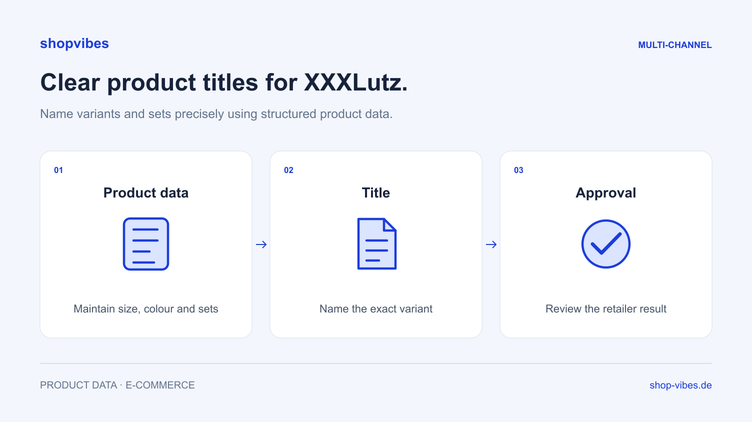
Three chair configurations share the same title. Colour appears only in the description, and the set is hard to distinguish from a single chair. Even checking the output becomes time-consuming. A structured title makes the items being offered easier to identify.
This guide covers preparation for XXXLutz Marketplace. It uses a fictional chair example and a workflow you can check from the product record to the submitted title. The XXXLutz Marketplace integration page explains the connection; the traditional supplier process is covered separately.
Check your category requirements first
The shopvibes instructions for XXXLutz Marketplace describe a title comprising a product type and suitable distinguishing features. According to that guidance, the retailer prefixes the brand, so it should not be repeated in the submitted title. Relevant set information must be identifiable, and variants need distinct titles.
Compare this structure with the current category template and the requirements agreed for your range. A character limit or specific mandatory attribute must come from the actual requirement. A title pattern alone does not confirm that a product group has been modelled correctly.
Separate product type, series, colour and included items
A reliable title starts with clear source data. Maintain the properties so they remain useful for other retailers too. An internal colour name can differ from the value submitted to a particular partner.
| Internal property | Example | Role in the title |
|---|---|---|
| Product type | Chair | Explains what is being offered |
| Series | MIRA | Identifies the model |
| Colour | Midnight blue or green | Distinguishes the configuration |
| Quantity sold | One chair or two chairs | Makes the actual included items clear |
| Brand | Fictional example brand | Not repeated in the submitted title for the process described here |
These are fictional internal product values, not an official XXXLutz upload schema. The original colour “Nachtblau” (midnight blue) can remain in the product record even if an approved output mapping uses “blau” (blue) for a German-language target channel. Check the required language for the actual account and category.
Before and after: three chair items
The example covers two single chairs in different colours and a separate set item. Check independently whether the retailer permits that set within the same variant group. The illustrative output titles retain German wording for a German-language listing; they do not prescribe titles for other markets.
| Item number | Unclear starting point | Clearer example title |
|---|---|---|
| DEMO-CHAIR-BL | “MIRA Premium” without a configuration | STUHL MIRA blau |
| DEMO-CHAIR-GR | The same title as the blue chair | STUHL MIRA grün |
| DEMO-CHAIR-BL-2SET | “MIRA blau” without a quantity | STUHL MIRA blau 2er-Set |
These example titles are not binding retailer requirements. They show how items can be distinguished through traceable properties. The title’s terms must match the product, category and items included.
Decorative props do not change the included items. If two chairs are sold, the set information must be clear in the relevant product fields. If the image also shows a table, the title must not imply that a complete dining set is supplied.
Derive titles from product data in shopvibes
The shopvibes help centre documents attribute assignments, fixed values and value mappings. The Complex Editor can combine attribute values with fixed text. This allows the title structure in the configured partner mapping to use your own data.
Work in this order:
- Define sources. Decide which properties supply product type, series, colour and set contents. Distinguish shared model information from values specific to a configuration.
- Check output values. Agree whether to retain the internal colour name or use an approved value mapping.
- Configure title construction. Combine the agreed properties in the intended order. Attribute names must match your actual data model.
- Test single items and the set. Compare resulting titles side by side. Look for missing values, repeated terms and incorrect quantities.
- Correct the cause. Change an incorrect product value in its source record. If output uses the wrong field, change the relevant mapping.
Configuring and editing mappings depends on the enabled template and your permissions. Conditional title components need an appropriate setup and test; a text combination does not imply an arbitrary rule language.
Investigate specific title issues
These observations are diagnostic examples, not original XXXLutz messages.
| Observation | Possible cause | Check after correction |
|---|---|---|
| Both colours have the same title | The title uses shared series text without a variant value | Generate and compare both configurations separately |
| The brand appears twice | It is already part of the submitted title | Compare the submitted text with the retailer’s displayed title |
| A single chair is described as a set | Quantity or set text came from the wrong item | Check item number, quantity and included items together |
| A title has a gap | An attribute is empty or assigned incorrectly | Check the source of the missing component and the complete title again |
| Title and image show different colours | Media reference or variant assignment is wrong | Compare title, record and image for the same item number |
Our furniture variants, colours and sets guide explains the underlying data structure.
Follow approval after submission
For XXXLutz Marketplace, the documentation describes automated data validation followed by manual retailer review. After submission, inspect both feedback and the actual result at the partner. A technically completed run does not confirm immediate publication.
When an attribute or value is questioned, trace the cause to the product record or mapping. The Mirakl import error guide provides a detailed check. No fixed retailer review period is promised here.
Checklist for your title run
- Have current category and title requirements been considered?
- Does each title use the correct model and variant values?
- Are colours and relevant set contents distinguishable?
- Is the brand not repeated in the process described?
- Do the title, included items and images match the same item number?
- Have corrections been generated again and checked at the partner?
A sound title mapping can be reused for further suitable items. Our retailer templates and mapping guide explains the principle. The furniture solution connects titles, variants, dimensions and media in a shared data model.
Bring three different items and your category requirements to a demo. We can discuss how to configure and check titles for your range.
Sources and review date
Reviewed on 3 November 2026. These German help centre instructions concern the named XXXLutz Marketplace process; they are not universal Mirakl or international title requirements.
- shopvibes: XXXLutz setup, title structure and approval
- shopvibes: mapping and value assignments
- shopvibes: combine attribute values and text
About the author

Author
Tim Hoffmann
Chief Product Officer, shopvibes
Tim Hoffmann is Chief Product Officer at shopvibes. His work focuses on product data management, marketplace integrations and e-commerce workflow automation.